Help
What is Loupe?
Loupe is a nature exploration and collection game aimed at young people aged 7 to 14, with wider appeal for families and adults. Players explore their surroundings and photograph the wild species that make up the local ecology.
Loupe is in development. The version available now is a prototype, and it is free to play.
This guide focuses on helping you get the app up and running. To learn how to play, open About Loupe from the game’s menu.
Installing the game
Loupe is a web app supplied directly by Karno. It is not in the Apple or Google app stores. The web address is app.loupe.games.
Android Phones
Chrome is the only supported browser on Android.
- Open the link in Chrome.
- Tap Get Started.
- Tap Install Loupe App.
- Tap Install.
- Find the Loupe icon on the home screen or in the app drawer, and tap it.
iPhone and iPad
We recommend Safari. Chrome only works on some iOS versions. The Share button and Add to Home Screen sit in different places depending on the iOS version, so some searching may be needed.
Safari
- Open the link in Safari.
- Tap the Share button.
- Find Add to Home Screen.
- Tap Add.
- Find the Loupe icon on the home screen and tap it.
Chrome
- Open the link in Chrome.
- Tap Get Started.
- Tap the Share button.
- Select Add to Home Screen.
- Tap Add.
- Find the Loupe icon on the home screen and tap it.
Creating an account
You need to create an account to play. From the login screen, tap the register link and enter:
- Username - must be 3–20 characters, start with a letter, and can only contain letters, numbers and underscores
- Email address
- Date of birth - tap the pencil icon at the top right to edit your date of birth
- Password - must be 8–72 characters and can use any mix of characters, with no required types
Children under 13 should register with a parent or carer present. The parent or carer should decide whose contact details to enter.
When the game first asks, you should allow camera, location and compass access. The game cannot work without them.
First time playing
The first time you open the game, Raven, the game's guide, leads you through a tutorial. If you close this by accident, or want to view it again, tap the Raven icon at the top right of the screen.
The first level only asks you to photograph a wild living species, submit it, and see what happens. More features unlock as you level up.
Poor signal is fine. When signal drops, the game switches to offline mode. You can keep photographing species; your photos are saved and can be submitted once signal returns.
Remember: photograph wildlife, don't handle animals or pick plants and fungi.
How we ensure safe play
The game never directs you to a specific place or asks you to carry out specific actions. Where you go is entirely your own choice.
Safeguarding
You give your date of birth when you register.
- Under 13s should register with a parent or carer, who decides whose contact details to enter
- If you’re under 16, your sightings are never shown to other players
- If you are 16 or over you can share your finds with other players. You can turn sharing off under My Profile → Account Settings
- Shared sightings show only a username, your badges and the species found. No other personal information is shared
Use of data
Karno never shares personal information with third parties, except where the law requires it or where one of our services needs it (for example, passing an email address to our email provider).
We train our AI model, CLAIDE, on sighting data with personal details removed: species, location, date and time only. We do not track individual player movements.
Loupe is hosted on a Karno server in the UK.
Karno is registered with the Information Commissioner's Office as a data controller, reference ZC105976.
Problem solving
Most install problems come from the wrong browser or a blocked permission. Check these first.
Android
| Problem | What to do |
|---|---|
| No Install Loupe App button | In Chrome, tap the three dot menu (⋮) menu (top right) and choose Install app or Add to Home screen. |
| Camera, location or compass blocked | Long-press the Loupe icon → App info → Permissions → allow Camera and Location. For the compass: Chrome → three dot menu (⋮) → Settings → Site settings → Motion sensors → allow. |
iPhone and iPad
| Problem | What to do |
|---|---|
| Can't find Share in Safari | Depending on the iOS version it is at the bottom or at the top and it looks like this:  Or ‘Share’ can be found inside the three dot ( … ) menu. On the latest iOS versions, Share is under ☰ in the Safari address bar (see image below). Chrome on iOS 27 and later doesn’t allow sharing, so use Safari. To check your version, go to Settings → General → About. 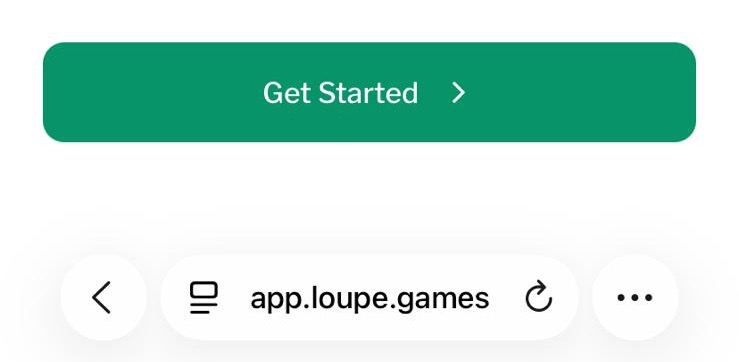 |
| Can't find Add to Home Screen | Open the Share menu and scroll down the list of options. |
| No Add to Home Screen in Chrome | Some iOS versions don't support this in Chrome (see above). Use Safari instead. |
| Camera, location or compass blocked | Settings → Safari (or Chrome) → allow Camera, Location and Motion & Orientation Access (the compass), then reopen Loupe. |
All devices
| Problem | What to do |
|---|---|
| No signal | Nothing to fix. The game works offline; photos are saved and can be submitted when signal returns. |
| The registration form does not accept my user name or password | Usernames must be 3–20 characters, start with a letter, and can only contain letters, numbers and underscores; Passwords must be 8–72 characters and can use any mix of characters, with no required types. |
| Anything else | Get in touch via our contact form |
Who is Karno?
Karno is a games development company based in Bristol. We make real-world games: games run by technology but played out in the real world, with other real people. More at karno.is/about.